
Free online invoicing with allocation numbers from the Tax Authority
Invoices and receipts, digitally signed, with an automatic allocation number from the Tax Authority. Free, with no document cap. Subject to the terms
 Software registered with the Israel Tax Authority
license 270001
No ads, no watermark on your documents
Support by email or through our contact form, average reply in 5 minutes
So what does free actually include?
0₪ a month
Unlimited document issuing, no credit card
No trial that runs out and no cap on how many documents you issue. Sign up and start issuing.
- Unlimited documents
- Unlimited businesses
- Unlimited customers
- Unlimited items
- Document validity check
- Digital signing
- Israel Invoice connection
- Advanced reports
- Expense management
- Tax advance calculation
- Filing with the Tax Authority
- Open Format export
- Import from your previous system
- Documents in English and foreign currency
- Accountant access
- Digital business card
- Pension and study fund simulator
- Advanced AI features
No fine print.
Everything you need to get paid, free
Invoices, receipts and quotes
All the document types you need for exempt dealers (osek patur), licensed dealers (osek murshe) and companies, including automatic allocation numbers from the Tax Authority.
Reports
Periodic VAT, detailed VAT in the PCN874 layout, profit and loss, receivables aging, income by month and by customer, sales by item, and payments by method.
Multiple businesses
Manage all your businesses in one account, each with its own numbering, templates and branding. Switch between them in one click.
Import from your previous system
Bring your history over from another system with an Open Format, Excel or CSV file. You get a reconciliation report before anything is saved, and old documents stay separate from your live numbering.
Documents in English and foreign currency
The same numbering sequence and digital signature as a Hebrew document. The exchange rate is signed into the document, and the shekel amount is stored for reporting.
Digital signing
Signing happens on the server at the moment of issue, with no smart card and nothing to install. A signed document is locked for editing, and a correction goes through a credit note.
Verification by scan or by link
Every document goes out with a QR code pointing at a public verification page, and the same link can be copied and sent to the customer. They see whether the signature is valid and the document is unchanged, and download the PDF, with no account and no login.
Built for phone and tablet
It opens in the phone browser and can be added to the home screen, where it launches full screen with no app store and nothing to download.
Full interface in English
The whole app switches to English, including menus, forms, error messages and document names, and the layout runs left to right. No screen is left half-translated over the Hebrew interface.
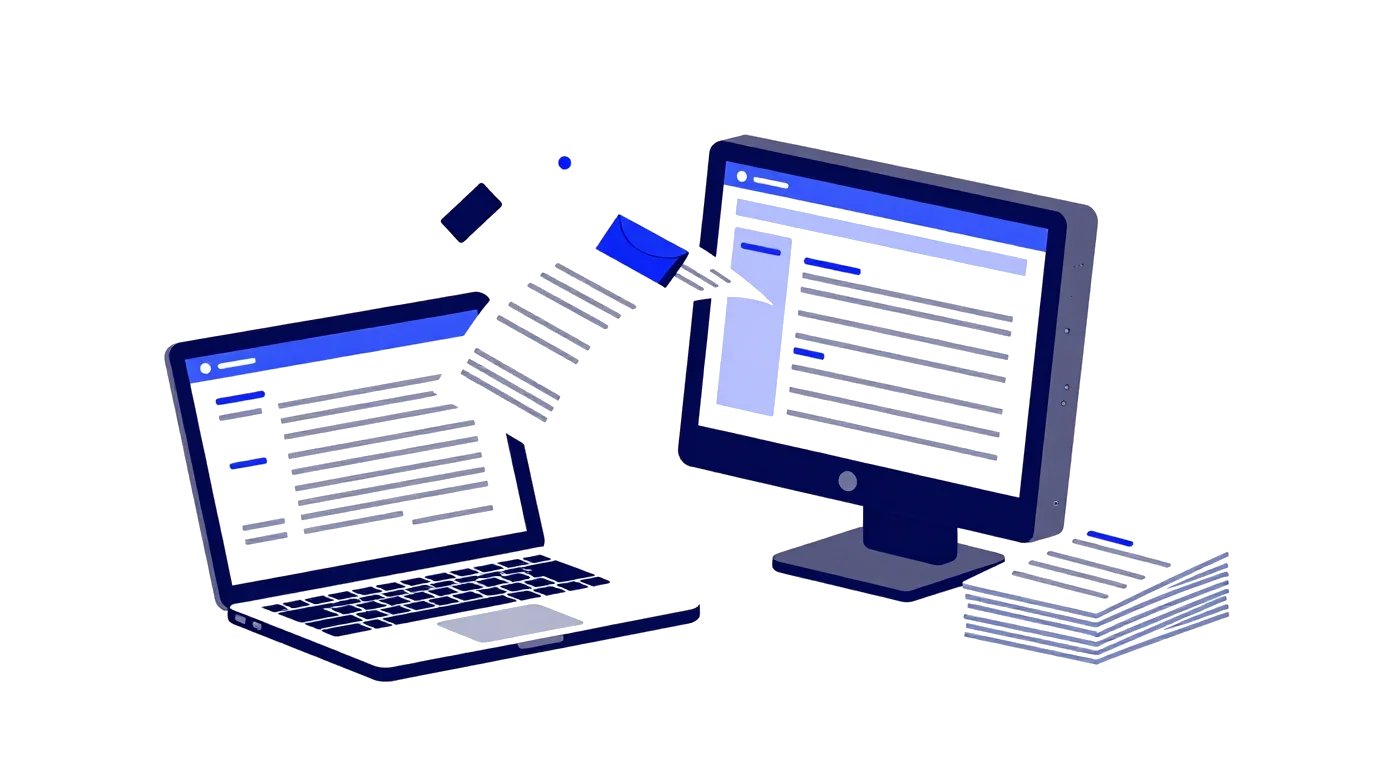
Your whole history from your old invoicing software moves over in two clicks
Slate imports Open Format, Excel and CSV files, and your old documents keep their original numbers.
-
1
Export
In your old software, click "Open Format export" or export to Excel.
-
2
Import
Upload the file to Slate, and the reconciliation report shows what came in before anything is saved.
What it looks like inside
Revenue, net profit, Israel Invoice status and questions about your books - all on one dashboard.
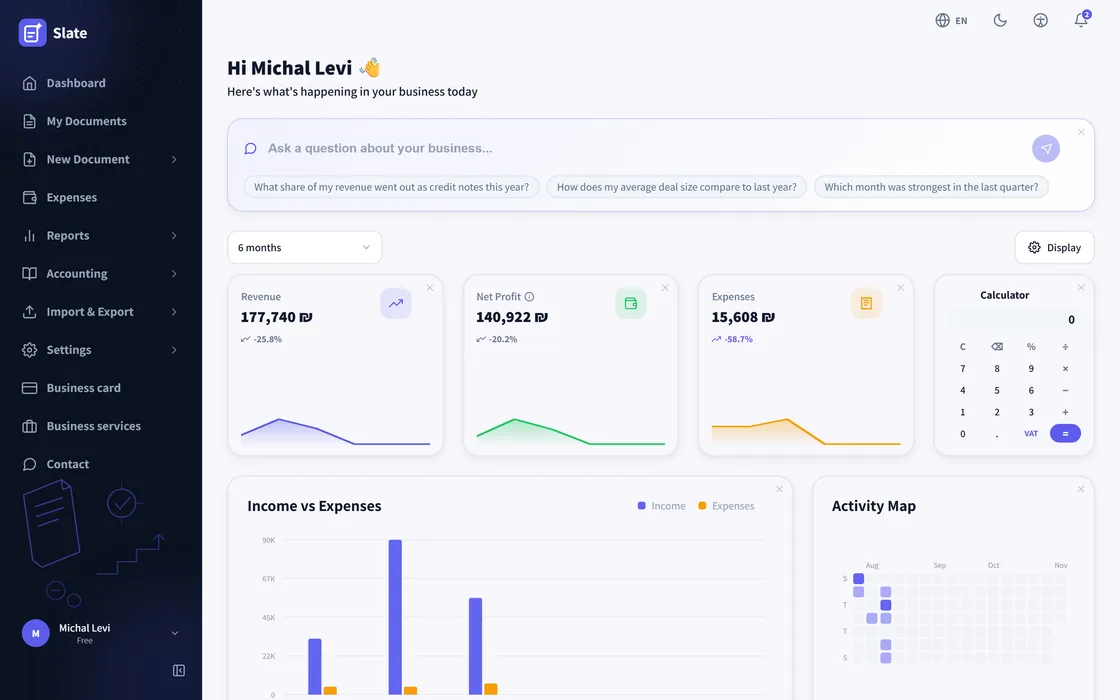
Screenshot from the app · Try the live demo
Issue a free invoice in five steps
No software to install, no Word template, no document quota.
-
1
Fill in your business details once
Name, dealer or company number, address and logo. They are saved and printed on every document from then on. Registration also asks for your business type, and that decides which documents you are allowed to issue.
-
2
Pick the document type
Tax invoice, tax invoice receipt, receipt, transaction invoice, quote, order, payment request, delivery note or credit note. Slate only shows the types your business type is allowed to issue, so you cannot accidentally produce a document you are not allowed to issue.
-
3
Add the customer and the line items
Description, quantity and price per line. VAT and the total are calculated as you type, at the rate set for your business. A line still being edited does not count toward the total.
-
4
Issue it
When you issue it, the document is signed, gets the next number in the sequence and is locked against editing. You get a PDF to download or send.
-
5
Get an allocation number for invoices over 5,000 shekels
A tax invoice whose pre-VAT amount is above 5,000 shekels needs an allocation number from the Tax Authority, otherwise your customer cannot deduct the VAT. The request goes out automatically right after issuing, the number is printed on the document, and if the request is rejected, the options the Tax Authority allows are available from the document page. Below the threshold this step does not apply.
Want to check an amount before you type it in? There is a VAT calculator on the site.
AI drafts, you decide
Every AI draft is only a suggestion - saved and sent only once you approve it.
See the AI featuresThis is what tidy bookkeeping looks like
Sequential numbering, digital signatures, allocation numbers and Open Format export, all automatic.
-
001
Sequential numbering, no gaps
Every document gets a sequential number locked on the server. No number is ever skipped, and an issued document can never be edited or deleted.
-
002
Automatic digital signing
Every invoice and receipt is digitally signed the moment it is issued, exactly as Israeli law requires.
-
003
Tax Authority allocation numbers
For tax invoices above the threshold, Slate requests the allocation number automatically. There is no extra form to fill in.
-
004
Open Format export
The INI and BKMVDATA files your accountant needs, in one click.
What you can issue, by business type
Exempt dealer (osek patur)
An exempt dealer charges no VAT and therefore may not issue a tax invoice. The documents are a transaction invoice, a receipt, a quote and a payment request, with no VAT line. Slate simply does not show the forbidden types, so a wrong document cannot be issued by accident.
Licensed dealer and limited company
All document types are available: tax invoice, tax invoice receipt, receipt, credit note, quote, order, payment request and delivery note. The VAT rate is set once and applied to every new document.
Not sure which status applies to you, or thinking about switching? There is a separate guide. Want to see what each document looks like? Nine sample PDFs.
Automatic allocation numbers from the Tax Authority, at no cost
Since May 2024, a tax invoice whose pre-VAT amount is above the threshold set in law has to carry an allocation number, otherwise your customer cannot deduct the input VAT. Since June 2026 the threshold is 5,000 shekels.
You connect to the Tax Authority once from settings, and from then on the request goes out by itself on every issue that needs one. If the Tax Authority does not answer, the invoice is still issued: you can ask again, record that you are continuing without a number, or file an objection. Each of those choices is logged on the document itself.
Frequently asked questions
Is there really free invoicing software, and where is the catch?
With us there is no catch. No document cap, no period that runs out, no credit card asked for at registration, and no charges that surface later. Unlimited documents, unlimited businesses, digital signing, the Israel Invoice connection, advanced reports, Open Format export, import from your previous system, documents in English and foreign currency, and advanced AI features, all at no cost and subject to the terms.
That is not the default in this market, which is why the question is a fair one. In most systems the word free describes one of three models, and it is worth recognizing which one you are looking at before you move your books in.
The first is a cap. You issue a set number of documents a year at no cost, and the moment you pass it the system switches to a subscription. That works for a business issuing one invoice a month, and it stops working exactly when the business gets busy. Check what happens at the moment you go over, too. Some systems block issuing until you pay, and that lands on the day you most need a document out.
The second is a trial. A month or thirty days, sometimes with no credit card up front, and a subscription after it. That is not a free system, it is a deferred payment. Anyone who moved their books in during that month is no longer really choosing at the end of it.
The third is the free tier that is missing the one capability you actually need. The common example today is the Israel Invoice connection, which opens only on the top plan. Above the threshold you cannot work without it, so in practice that is a paid plan with a free landing page.
Two pricing traps sit in the small print. The first is a price shown per month and billed a year in advance, which makes leaving cost money. The second is the counting itself: quotes, delivery notes and orders are sometimes counted against the quota alongside the invoices, and the cap arrives sooner than you expected.
Four questions worth asking of any offer, ours included: what counts as a document for the quota, whether the Tax Authority connection is included, whether billing is monthly or annual up front, and what happens to the data the day you stop paying.
Do I need to download invoicing software, or does it work without installing?
There is nothing to download. Slate runs in the browser, on a computer and on a phone, and you can add it to the home screen and use it like an app. No installer, no version to update and no dependence on one particular machine.
This is not only a convenience question. Installed software runs on one computer, and that computer is also the backup, the update and the single point of failure. Legislative updates arrive as a version you have to install, and until you do you are working to last year's rules. In years when the VAT rate or the allocation-number threshold changes, that gap turns into incorrect documents.
Someone searching for free invoicing software to download usually wants two things: not to pay, and not to depend on anyone. The first is answered by a genuinely free plan. The second is answered by export rather than by installation. Installed software that cannot produce an Open Format file locks you in just as firmly, the lock simply sits on your own disk.
What is worth confirming before you start: that the system works in the browser you actually use, that you can use it on your phone, not only on a computer, and that you can pull a copy of your data at any time without asking permission.
Is there a free invoicing app for the phone?
Slate works on the phone through the browser, and you can add it to the home screen so it opens like an app, full screen and without the address bar. No app store and no download.
What this mostly changes is timing. An invoice issued at the end of the meeting, from the phone, is an invoice that went out. An invoice put off until the evening is sometimes an invoice that gets forgotten, and by the time it comes back to you it carries a different date.
What to check in a free invoicing app is exactly what you check on the desktop. Whether the document is digitally signed, whether numbering is held on the server rather than on the device, and what happens when you issue from two devices on the same day. Numbering kept on the device produces duplicates the moment there are two devices.
In Slate all of it happens server side, so the same business can work from the computer and the phone at once without two numbering sequences, and anything issued is available in both places immediately.
Is there an app for scanning and keeping receipts?
Yes, and it is part of the same free account. Take a photo of a receipt on the phone, and the system reads the supplier, date, amount and VAT from it and fills in the expense form. Check it, correct it if needed and save.
You can also drag in a whole folder of receipts from the month. The receipt image is kept with the expense, so it is there for the accountant and the VAT report without a binder.
Can an exempt dealer (osek patur) issue invoices for free, and which documents are allowed?
Yes, and it is exactly the same free plan. There is no separate tier and no limit that applies only to an exempt dealer.
What does differ is the document types, and that comes from the law rather than from the system. An exempt dealer charges no VAT and therefore may not issue a tax invoice. The documents are a transaction invoice, a receipt, a quote and a payment request, with no VAT line. What every receipt has to carry is explained on the osek patur receipts page. A licensed dealer (osek murshe) and a limited company also issue a tax invoice, a tax invoice receipt and a credit note, alongside quotes, orders, payment requests and delivery notes.
You pick the business type at registration, and from that point the system shows only what is permitted. An exempt dealer simply does not see the option to issue a tax invoice, and sees no VAT field on the document. That sounds like a small detail and it is not. An exempt dealer who issued a tax invoice did not make a typing mistake, they charged tax they were not entitled to charge.
If you later become a licensed dealer, nothing you issued before is affected. The document set widens, the VAT rate is set once and applied to new documents, and the old documents stay exactly as they were issued, with their numbering.
Are the Israel Invoice connection and allocation numbers included for free?
Included, with no separate plan and no add-on. This is also the point to read any other free offer closely, because it is the feature most often put behind a paywall.
The background: since May 2024 a tax invoice whose pre-VAT amount is above the threshold set by the Tax Authority has to carry an allocation number. Without one your customer cannot deduct the input VAT. The threshold currently stands at 5,000 shekels and drops in stages under the legislation, so the share of invoices that fall under the obligation grows over the years. The test is an amount above the threshold, and the VAT itself is not counted in it. An invoice of exactly 5,000 shekels does not need one yet, an invoice of 5,001 does.
Without a connection, you approach the Tax Authority separately for every invoice over the threshold and type the number back into the document. That is bearable at one invoice a month and falls apart at ten. With a connection, you connect once from settings, and from then on the request goes out by itself on every issue that needs one, and the number lands on the document and is printed on it.
What separates a complete implementation from a partial one is what happens when the Tax Authority does not answer. This is an external service, and its availability is not up to the system. In Slate that does not stop the invoice from being issued. The invoice goes out, and from the document itself you can ask for a number again under the same identifier as the procedure requires, record that you are continuing without a number, or file an objection. The choice is logged and reported back to the Tax Authority, and until it has been reported it stays flagged as open so it is not forgotten. An invoice that went out without a number carries the note the law requires, so your customer knows what they received.
Is Open Format export for my accountant included for free?
Included, in one click, with nothing to request and nothing to pay.
Open Format is the format the Tax Authority defines for exporting a business's books, an INI file together with BKMVDATA. It is what your accountant asks for at the end of the year, and what gets examined if an audit arrives. You can also export the periodic VAT report and the document list.
The difference between that and an Excel export is larger than it sounds. A table in Excel is something you can look at. An Open Format file is what another system knows how to take in and what your accountant expects to receive. A system that offers only an Excel export leaves the translation as manual work, and it is usually done by the accountant and billed by the hour.
This is also the capability that makes the word free mean something. A free plan that keeps the data inside is only free on the way in. If everything can come out at any moment, the price of staying is a choice rather than a constraint.
A practical tip: run an export on day one, not on the day you need it. A file that opens and can be read is the real answer to this question, in any system.
Why is it free, and how do you make money?
Because the things that make a document a valid document should not be a paid add-on. Sequential numbering, digital signing, retention and export are not advanced capabilities, they are what the law requires of every dealer, including one issuing three invoices a month.
In a market where most free plans end exactly when a business starts working, and where the Israel Invoice connection usually opens only on the top plan, we built what we wanted to exist when we opened a business ourselves. Slate was built for the community of self-employed people in Israel, for a business of one and a business of five, and not for an organization with a finance department.
What that means in practice: unlimited documents, unlimited businesses, digital signing, the Israel Invoice connection, advanced reports, Open Format export, import from your previous system, documents in English and foreign currency, and advanced AI features, with no credit card at registration and subject to the terms.
What it does not mean: we do not sell your data and do not pass it to a third party, and we use your documents for nothing beyond showing them to you. Your books are yours, and you can take them out at any moment.
I already use another system. How do I move my history across?
Three routes, depending on what your current system can export. An Open Format file, meaning INI together with BKMVDATA, is the complete one, and every Israeli system is required to produce it. If all you can get out is Excel or CSV, that comes in too: the AI maps each column onto a field in the system, with headers in Hebrew or English and in any order, and you see the mapping and correct it before approving. Expenses can come in as receipt photos, one at a time or a whole folder at once, and each receipt lands in a review table where you can fix a field or drop a row before saving.
On every route, nothing is written until you approve it. The import shows a reconciliation report of what came in, what was rejected and why. Approving that report is your declaration that the historical data is correct, because we do not verify it against your previous books.
Imported documents keep their original numbers and are stored separately from the live sequence. They do not join the new run, so an old invoice cannot take a number meant for a new document. Historical invoices are also not sent for allocation numbers after the fact.
Order matters. Export from the old system, import, check the reconciliation report, and only then issue your first new document. The historical import has to happen before the live numbering starts. Every step and check is in the guide to switching invoicing software.
What happens to my documents and data if I stop using it?
This is a question worth asking before signing up rather than after. A system that makes leaving difficult profits from that difficulty, and the cost surfaces at the least convenient moment.
The documents you issued are yours. They are not deleted when you stop using the system, and export is available at all times with nothing to request. You take an Open Format file, the periodic VAT report, the document list and the documents themselves. If you move to another system, that same file is how you bring your books with you.
It is worth remembering that the seven-year retention obligation does not depend on whether the account is active, or even on whether the business still exists. A business that has closed is still bound by it, and the responsibility stays with the owner even when the documents sit with a supplier. So the simple recommendation is to export once a year, around the annual return, and keep the file somewhere you control.
Three things worth checking with any provider, us included: whether export is included or charged for, whether it is available after the account is no longer active, and how long the data is kept after closure. A clear answer to those three is worth more than any feature list.
News
Check Point firewalls hijacked, servers wiped in Israel
Attacks from 30 October used the PHP2Shell flaw to seize unpatched gateways, while fake Microsoft emails exploit the 365 outage.
Owners who left Israel in the war must prove they cut losses
A Fahn Kanne CPA said the Tax Authority sought to reject compensation claims from business owners who spent long stretches abroad during the war.
Businesses think customers like AI service bots; 51% agree
Twilio survey, 9 November: 86% of companies believe customers are happy with AI service, while 78% of consumers have tried to get past the bot to a human.
Ready to issue your first invoice?
Slate is free to use with no limits, Israel Invoice integration included. No credit card, no trial that runs out.
Open a Free Account