

Osek patur ("exempt dealer") and osek murshe ("licensed dealer") are the two possible statuses a self-employed person can hold with the Israel Tax Authority. Which one you have determines what kind of documents you're allowed to issue, whether you're required to charge VAT, and whether you can deduct input VAT on expenses. The choice isn't always yours to make.
Osek Patur
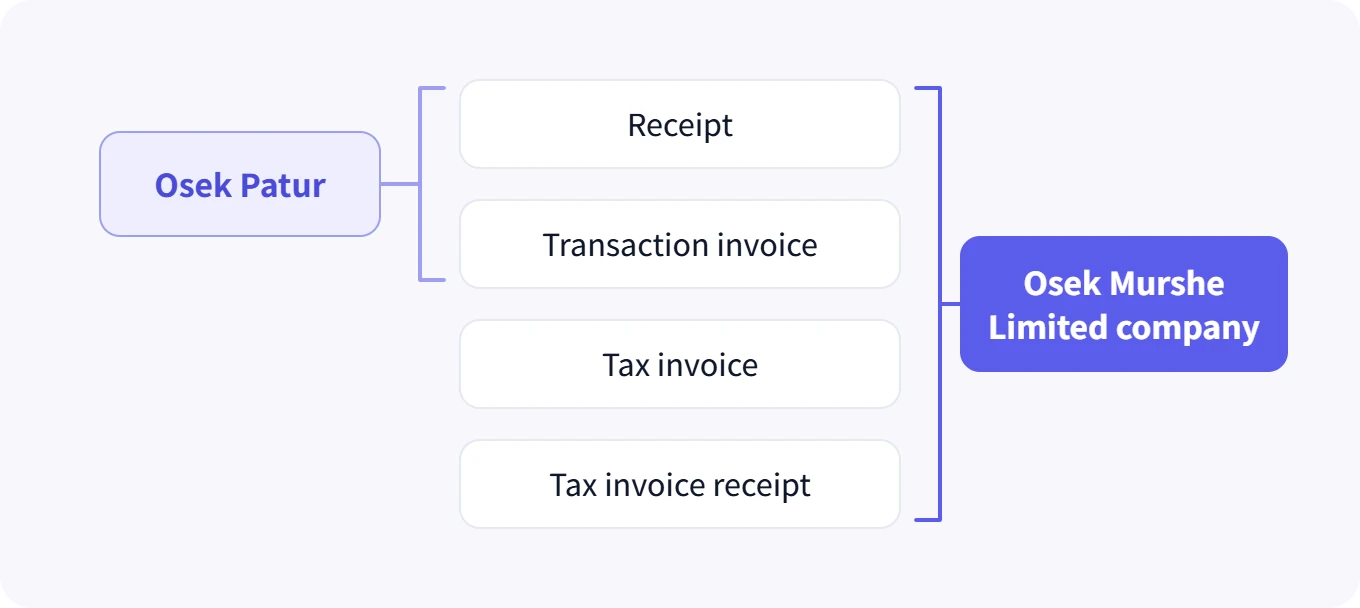
An osek patur is exempt from charging VAT to customers and from remitting VAT to the Tax Authority, as long as annual turnover stays under a threshold set by law and updated every year. Instead of a tax invoice, an osek patur issues a transaction invoice and a receipt as two separate documents. In exchange for the VAT exemption, an osek patur also cannot deduct input VAT on business expenses.
Some professions are barred from operating as an osek patur at all (certain licensed professionals, for instance), regardless of turnover. It's worth checking this with an accountant before opening your file.
What the exemption does not cover
The exemption is from VAT only. An osek patur still files an annual income tax return, still pays National Insurance advances, and still has to keep books and retain documents. The word "exempt" misleads enough people that it's worth saying outright.
Another source of confusion is osek zair, which sounds like another rung on the same ladder and is in fact a separate income tax track. The two are pulled apart in the micro-business versus osek patur guide.
Osek Murshe
An osek murshe must charge customers VAT and remit it to the Tax Authority every month or every two months, through a periodic VAT report. In return, an osek murshe can deduct input VAT on business expenses, meaning they get back the VAT they paid on equipment, services, and other business-related costs.
The practical difference in issuing documents
| Osek patur | Osek murshe | |
|---|---|---|
| Document issued to customer | Transaction invoice + receipt | Tax invoice (+ receipt if paid) |
| Charges VAT | No | Yes |
| Deducts input VAT | No | Yes |
| Periodic VAT report | No | Yes |
| Israel Tax Authority allocation number | Not applicable | Required above a certain threshold |
Each document type is broken down in the guide on tax invoices, transaction invoices and receipts, and what an osek murshe actually issues is collected in the osek murshe invoice guide.
- Your expected annual turnover against the ceiling set in law for that year
- Whether your line of work is allowed to operate as an osek patur at all
- How much input VAT you expect on equipment, services and rent
- Who your customers are: businesses that deduct VAT, or private customers
Who your customers are, and why it decides this
This is the factor most freelancers skip. When you sell to private customers who can't deduct VAT, osek patur status is a genuine price advantage: the same service costs the customer less, because no VAT sits on top.
When you sell to business customers, the picture inverts. A business receiving a tax invoice deducts the VAT on it, so its effective cost is the before-VAT amount. In that case your price as an osek murshe isn't "more expensive" to them, while as an osek patur you simply can't recover the VAT you paid on your own expenses.
When the exemption actually pays
An osek patur turning over ILS 100,000 a year with ILS 30,000 of expenses including VAT gives up roughly ILS 4,576 of input VAT, which is the VAT inside those expenses. If most of their customers are private, they earn that back through the price advantage. If most are businesses, they've just lost it.
The osek patur threshold calculator shows how much room is left before the ceiling, and the deductible expenses calculator shows how much of your expenses is deductible for income tax.
The ceiling, and how it is counted
The ceiling is measured on turnover, meaning the business's total income before expenses are taken off. A business that took in ILS 130,000 and spent ILS 40,000 crossed the ceiling, even though its profit was ILS 90,000. That is the most common mistake on this subject.
Counting runs by calendar year, January to December, not by a year counted from the day the file was opened. A business that opened in August gets the full annual ceiling in its first year, even though it traded for only five months.
For 2026 the ceiling stands at ILS 122,833. It is updated each year against the price index, so check the current figure rather than relying on last year's. The osek patur threshold calculator shows how much room is left.
When switching to osek murshe becomes mandatory
Moving from osek patur to osek murshe is mandatory, not optional, the moment annual turnover crosses the threshold set by law for that year. Breaking this rule exposes you to fines and to retroactive VAT. The full process is covered in the guide on the switch to osek murshe.
You can also switch voluntarily, before the ceiling is crossed. That makes sense when your customers are businesses, or when a large equipment purchase is coming that you'd rather deduct VAT on.
What about a limited company
A limited company isn't a third status on the same axis. It's a separate legal entity, which behaves like an osek murshe for VAT purposes but is taxed completely differently for income tax (corporate tax, then dividend tax when profits are drawn). Which one works out better depends on the profit level and on how much money is actually drawn out of the business.
How this shows up in the system
Slate reads the business status set in your business settings and automatically adjusts which document types are available to issue and how VAT gets calculated, so it's not possible to accidentally issue a tax invoice as an osek patur, or forget to charge VAT as an osek murshe. Anyone starting a new business should begin with the guide on opening an osek patur file, and both statuses can issue invoices for free.
This is general information, not tax advice. For a specific situation, talk to an accountant or tax adviser.
Common questions
What is the main difference between an osek patur and an osek murshe?
An osek patur charges no VAT to customers and deducts no input VAT on expenses, issuing a transaction invoice and a receipt. An osek murshe charges VAT, deducts input VAT, issues tax invoices and files a periodic VAT report.
What is the osek patur turnover ceiling?
For 2026 it is ILS 122,833 in annual turnover. It is updated yearly, and it is measured on turnover, meaning total income before expenses, not on profit.
What happens if I cross the ceiling mid-year?
Switching to osek murshe is mandatory from the moment of the crossing, not from the start of the next year. VAT applies to the part above the ceiling, and reporting it late exposes you to retroactive VAT and fines.
Is an osek patur exempt from income tax as well?
No. The exemption is from VAT only. An osek patur files an annual income tax return, pays National Insurance, and has to keep books and records for seven years.
Can I register as an osek murshe voluntarily?
Yes. You can register above the exemption even while under the ceiling, which makes sense when your customers are businesses that deduct the VAT anyway, or when a large equipment purchase is coming that is worth deducting input VAT on.
Can any profession be an osek patur?
No. Regulations require certain professions to register as an osek murshe regardless of turnover, among them doctors, lawyers, accountants, architects and engineers. Worth checking before opening the file.