
Business travel reports with AI in Slate
Upload 3 documents: the flight ticket, the hotel invoice and the car rental receipt. The AI reads the destination, dates, nights, amounts and payment day from them, and Slate applies the income-tax caps table you used to work through by hand. Within 10 seconds the report comes out as a signed PDF for your accountant, with every document attached in one file if you want. Producing it records the recognized total as one expense.
Open a free account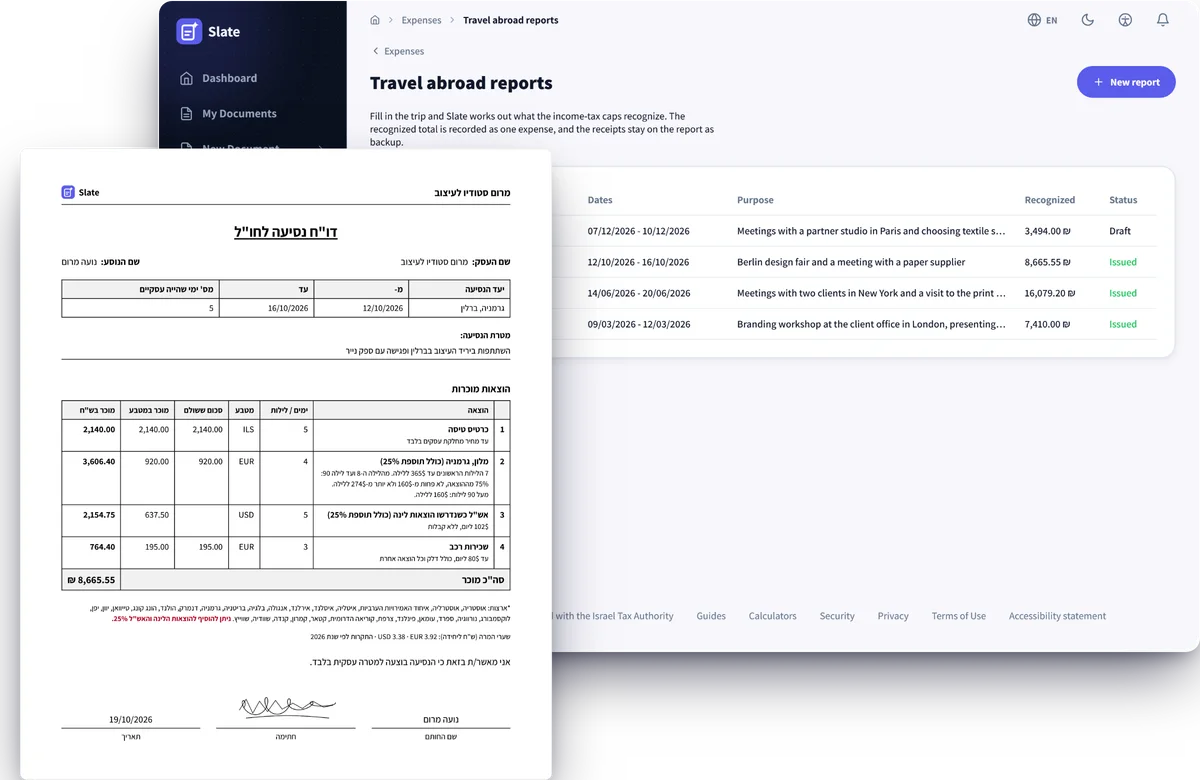
AI reads each document and fills in its row
The flight ticket, the hotel invoice, the car rental receipt and the conference invitation each go on their own row. AI recognizes which document it is and fills in the amount and currency, the payment day, the nights or days, and the destination and dates of the trip. From the conference invitation it writes the purpose of the trip. You can correct any field by hand. Each row shows its own exchange rate. The documents stay on the report as backup and are not recorded as separate expenses.
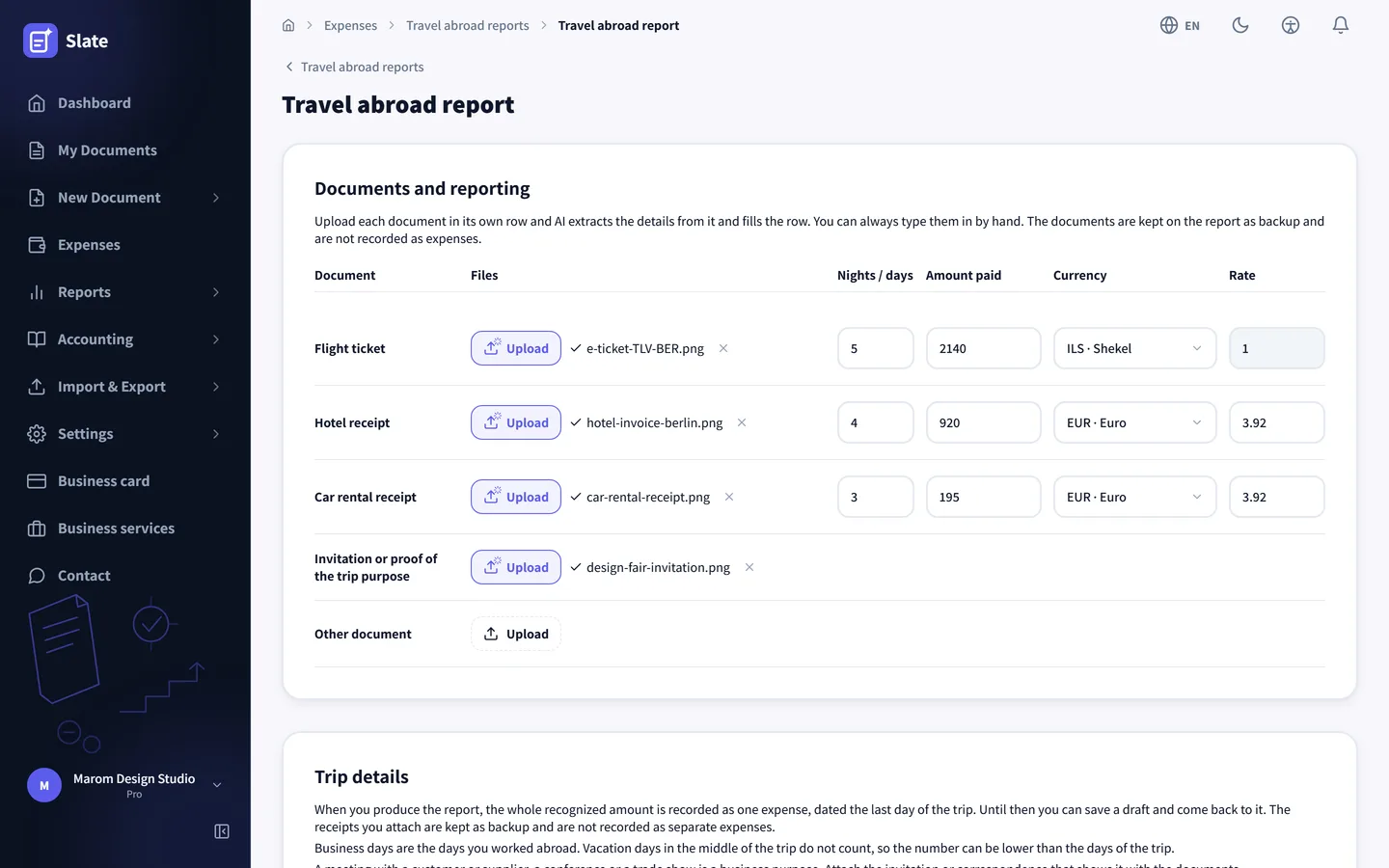
Destination and dates AI read from the flight ticket
Below the documents sit the trip details: who travelled and why, the country, the city, the dates and the number of business days. Vacation days in the middle of the trip do not count, and the form says so above the fields. When the destination is on the expensive list, a note under the country says its caps are 25% higher. Once the flight ticket is scanned most of these fields are already filled in, including the number of travelers on the booking. A trip with several destinations goes into one report.
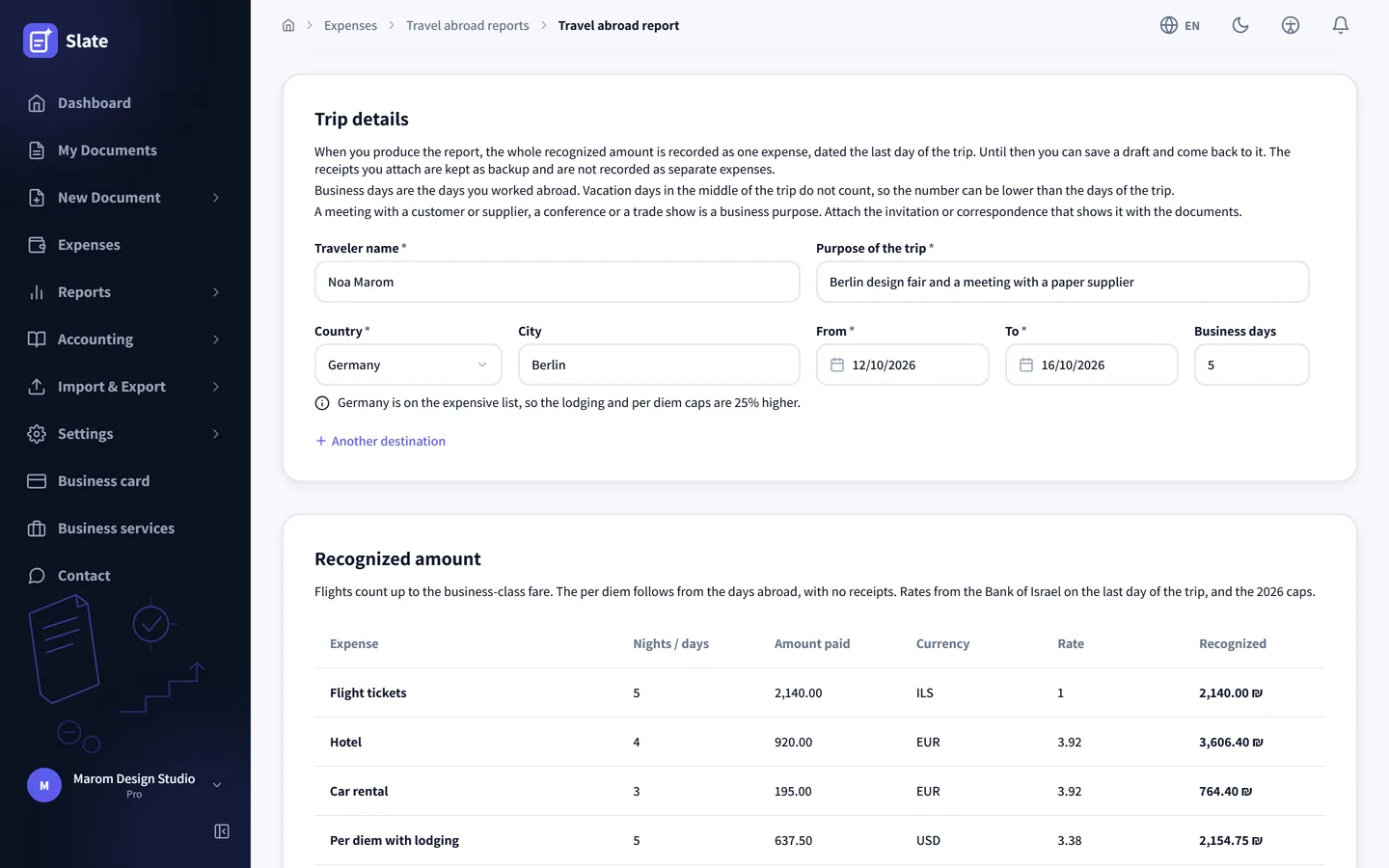
How much of each expense counts
The table shows, for every expense, what was paid, in which currency and at which rate, and how much of it is recognized in shekels. Each expense converts at the Bank of Israel representative rate of the day it was paid, a day the AI reads from the receipt, and per diem at the average rate over the days of the stay. The caps are those of the trip year. A flight is recognized up to the business class fare. Per diem counts the business days with no receipts: $102 a day when lodging was claimed and $171 when it was not, plus 25% in an expensive country.
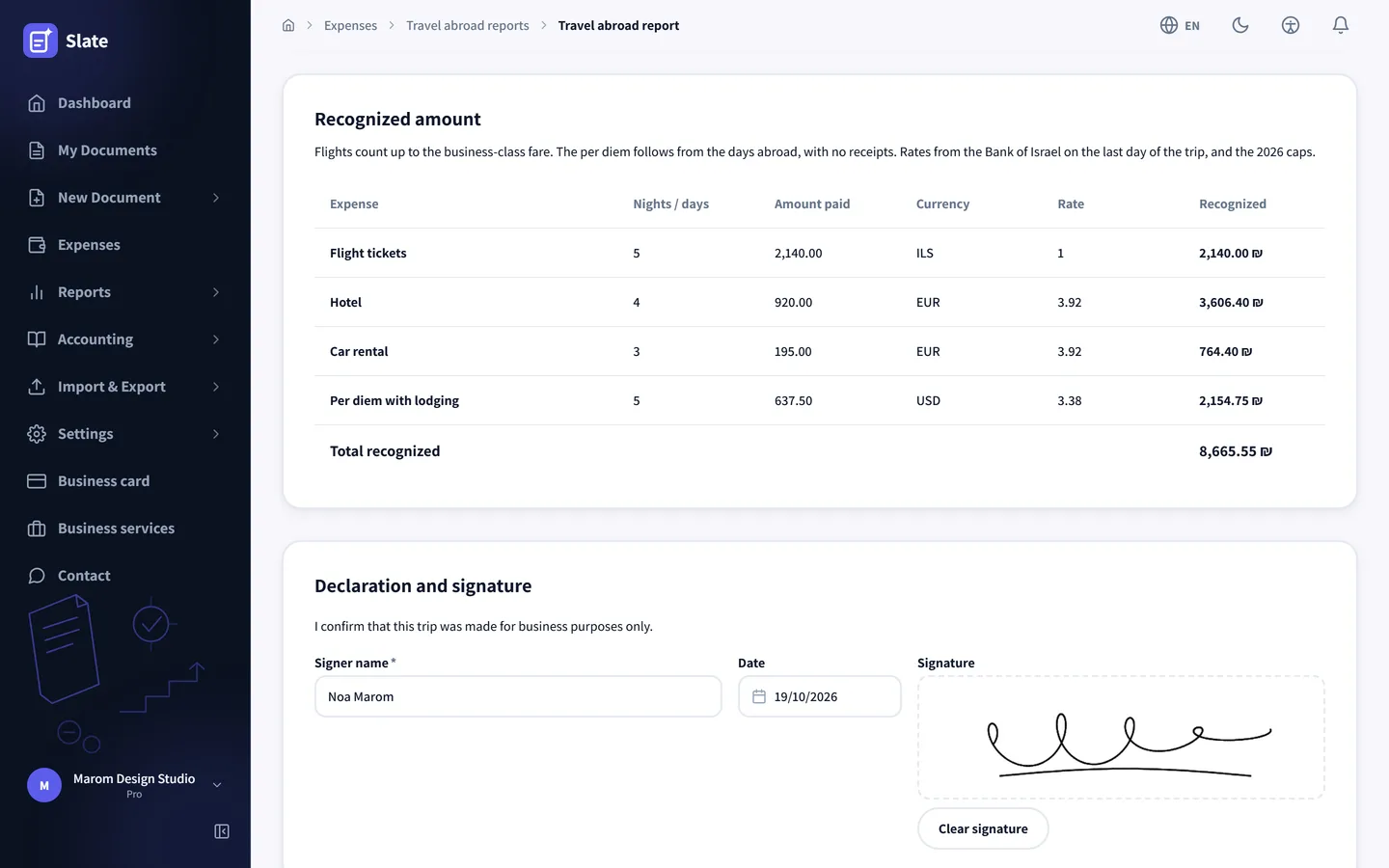
Save a draft, produce it when it is ready
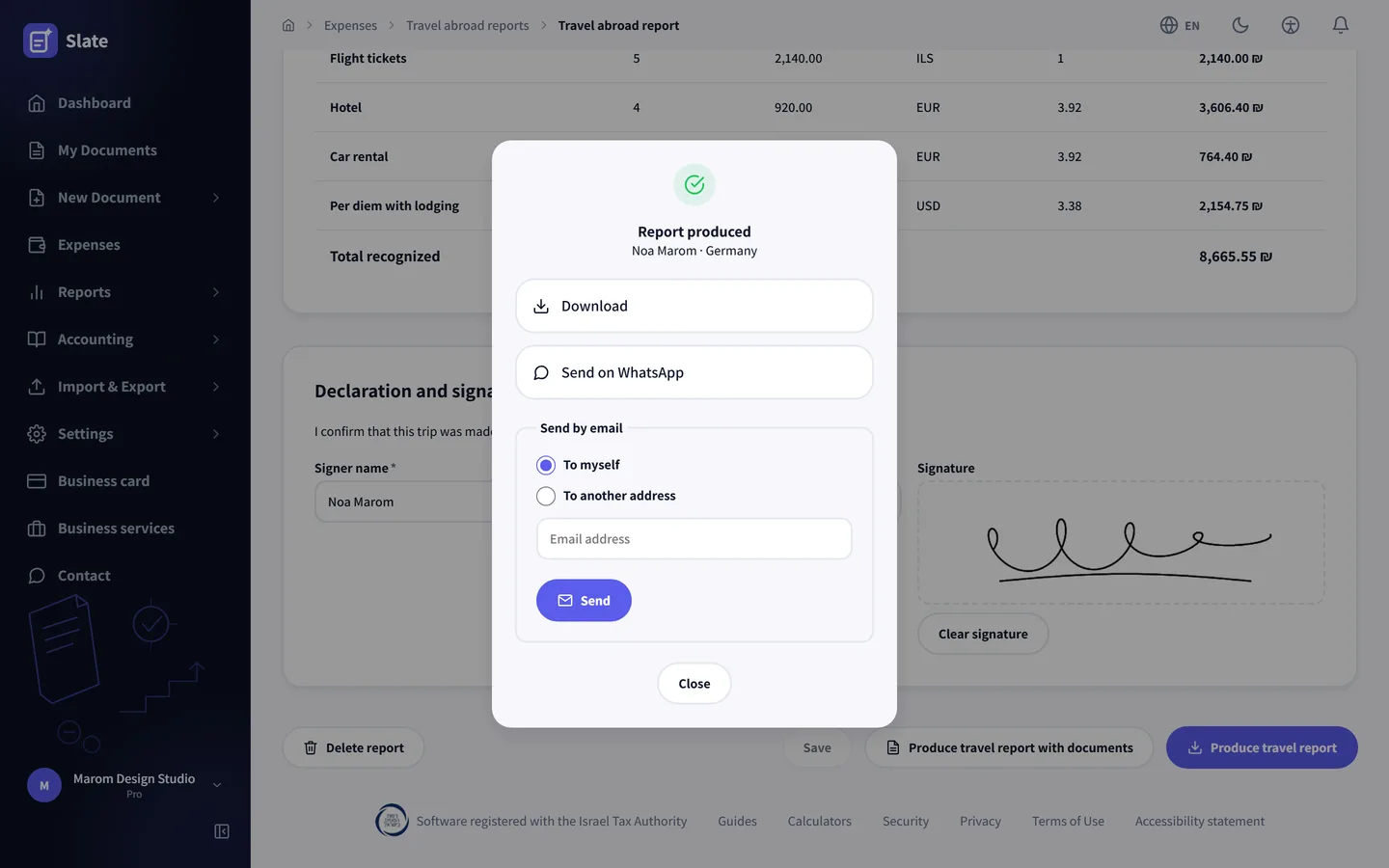
A report still missing a receipt is saved as a draft, and the reports list shows which ones are drafts and which were produced. The report ends with a declaration that the trip was for the business and a signature drawn with a finger or a mouse. Producing it records the whole recognized amount as one expense in the travel abroad category, dated the last day of the trip, and opens a window with a download, a WhatsApp share and an email: to yourself, to another address or to the accountant connected to the account.
A Hebrew PDF laid out like the paper form
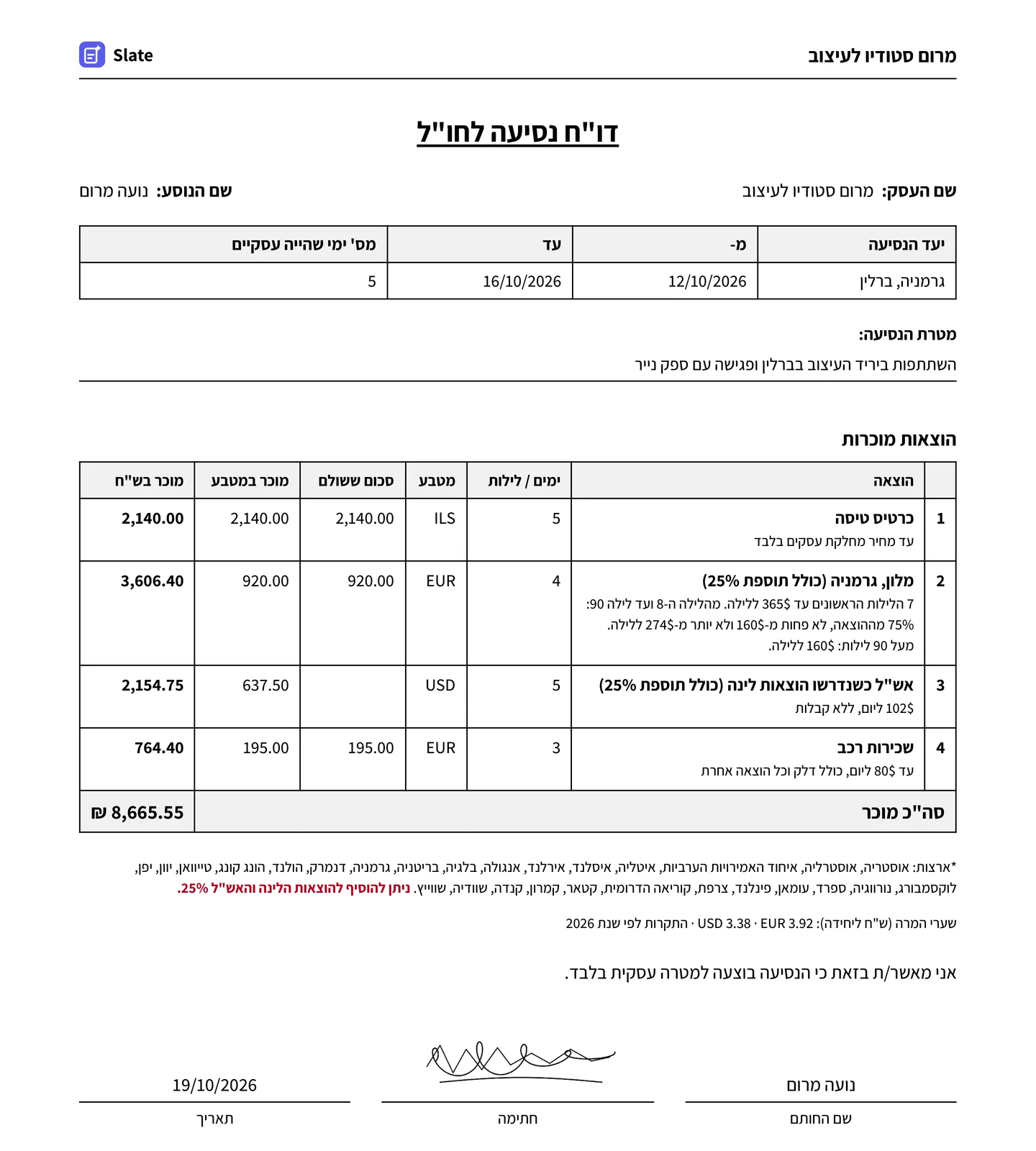
The report prints in the order accountants know: the business name at the top, destination and dates, the purpose of the trip, the deductible expenses with the amount in the foreign currency and in shekels next to each cap, the exchange rates and a signature line. The report always prints in Hebrew. A second button produces one file with the flight tickets, receipts and invitation bound in after the report, so the backup arrives with it.
-
The caps of the year you travelled
Each report uses the caps of the year the trip ended in, and keeps them. When the caps change in January, a report from the year before stays as it was.
-
Nights count across the whole trip
The first 7 nights are recognized up to $365 a night, so a New York hotel at $410 a night counts as $365. From the eighth night the 75% rule applies, and the count runs across every hotel of the trip, in order.
-
A 25% addition in 28 countries
In Germany, the UK, Japan and 25 more countries the lodging and per diem caps are 25% higher. The form recognizes the country and applies the increase automatically.
-
Several destinations in one report
Paris and then London go into the same report, each with its own dates, business days and lodging.
-
Car rental up to $80 a day
The cap covers the rental, fuel and every other cost of the car. Anything above it stays out of the recognized amount.
-
Open on the Pro plan
Travel abroad reports are part of the Pro plan. On another plan the screen opens read-only, with a note on how to upgrade.
A trip inside Israel is an ordinary expense
The report is built for trips abroad. Inside Israel a hotel night is deductible when it is at least 100 kilometres from your home or business more from home or the business, and meals on the road are not, apart from a breakfast included in the hotel price. A trip inside Israel is therefore recorded under expenses in the travel and lodging category, with its receipt. The full rules are in the guide to deductible expenses.
VAT you paid abroad
VAT charged at a hotel in Berlin is not offset in the Israeli VAT return, so the expense the report records carries no input VAT. A flight abroad is sold at zero VAT anyway. Some EU countries refund VAT to a foreign business through a separate claim filed with them, outside Slate. What can be offset in Israel is covered in the input VAT guide.
Every screenshot on this page comes from a test account of a made-up business with sample documents. It has 3 trips produced in 2026, London in March, New York in June and Berlin in October, and a draft for Paris in December.
3 documents, AI fills them in, and the report is ready in 10 seconds
Until now a report like this was built by hand: the income-tax caps table, a representative rate for every currency, counting the nights and applying the 75% rate from the eighth night on, and one mistake in a rate or a night changes the total. Now you upload the flight ticket, the hotel invoice and the car rental receipt. The AI fills in the report from them, Slate calculates the recognized amount, and all that is left is to check it and produce the report, on its own or with every document attached.
Open a free account